Dema, now in Slack
Ask Dema from Slack
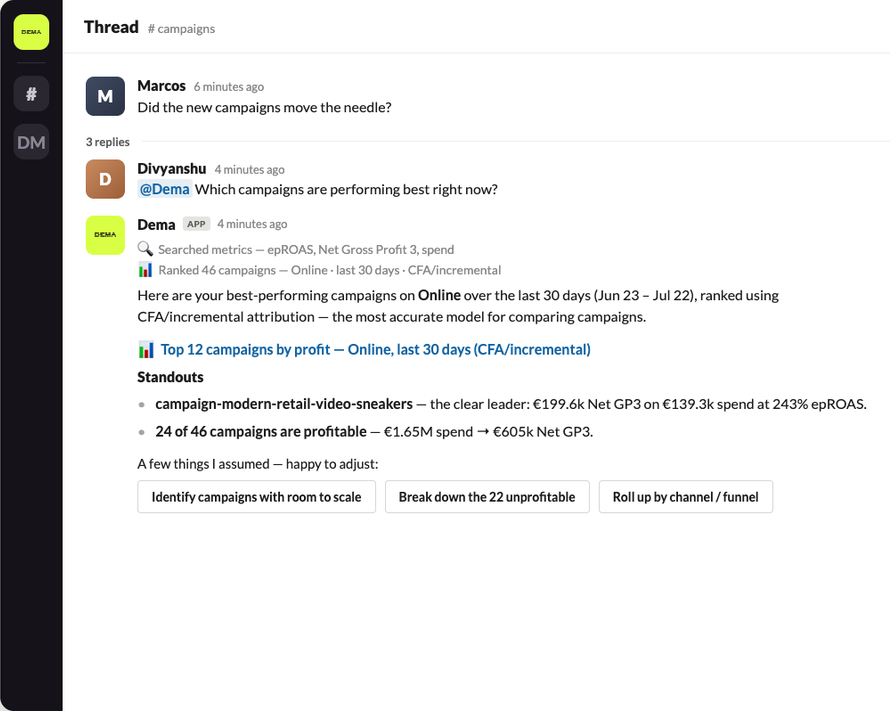
The Dema app is now live in the Slack Marketplace, so you can ask your agents about your business right where your team already talks. Send Dema a direct message, or mention @Dema in any channel it's been invited to, with something like "Which campaigns are underperforming?". The answer comes back in the thread with charts and analysis, and a link to the full detail in Dema. You can keep the thread going with follow-ups.
Link your own Slack account, and Dema can also work inside your workspace for you. It can search the messages and channels you have access to, so its answers pick up the context of an ongoing discussion. It can summarise a long thread into a canvas your team can keep working in, and send, draft or schedule follow-ups back into the conversation.
Everything runs with your own Slack permissions, so Dema only sees what you can see. It reads private channels, direct messages and group DMs only when you ask in a private conversation, either your DM with Dema or your own chat in the Dema app, and you approve each read. It never reads them in a channel or group DM where others could see the answer. To get started, connect your workspace under Settings > Connected accounts.
New agent connectors
Agents can now work with Meta Ads Official MCP, Contentsquare, Notion and TikTok Organic, and send email from Outlook. The Meta Ads connection uses Meta's own tools for campaigns, audiences, creative and measurement, on the ad accounts you select. With Contentsquare, ask about site metrics, funnels, customer journeys and the errors that hurt conversion
Name your connections
If you connect more than one account from the same platform, you can now give each connection a name. Multiple Nosto accounts are supported from today. When an agent asks for approval, the prompt shows which connection it will use and who owns it. If more than one connection could fit, the agent asks you to pick one.
A few smaller things
You can upload PowerPoint files in a chat. The browser tab now shows whether an agent is working, done or waiting on you. Agent files can be browsed folder by folder, and you can search them by name when you mention one. You can also edit expected ROAS on incrementality tests, drafts included.